WhyCreating an EFI partition with all the convenient tools (rEFInd, Grub, memtest, …)
- Hardware is of type
x86_64. - Secure boot is not used (no key management, or signing of binaries).
- Following script fragments are using FreeBSD commands.
For example thetarcommand is based on libarchive and is able to process multiple archive format, including zip files. - The
$EFIenvironment variable is to be defined and point to theEFIdirectory in the mounted ESP partition.
- Reference: Specifications
- Bootloaders: rEFInd, iPXE, Grub, Super Grub 2 Disk, shim.
- Tools: GPT fdisk, Memtest86.
- Follow-up: iPXE
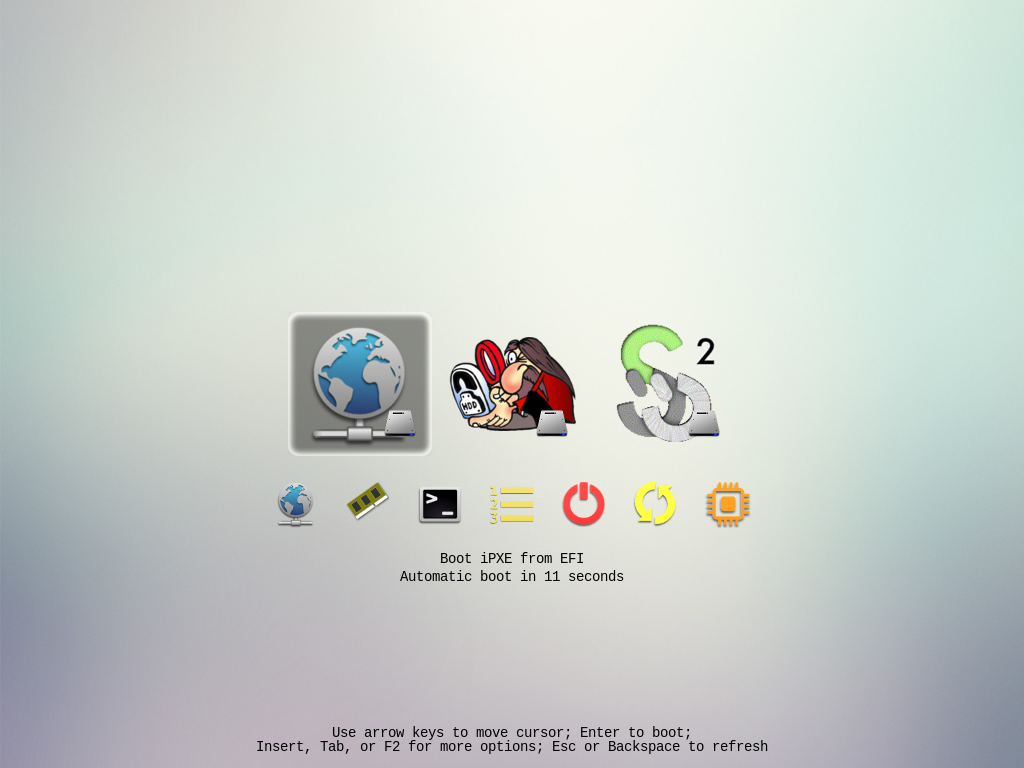
Configuration
- Requirement: EFI bootloaders and tools installation (below)
- Information: Bootloaders fallback
When using hypervisor such as Bhyve, the provided
UEFI is not able to store data in NVRAM, so configuring boot information
is not possible, it will be necessary to store the boot loader
at the default location EFI/BOOT/bootx64.efi. In our case shim
can be used to reconstruct a boot configuration (using BOOT.CSV)
mkdir -p ${EFI}/BOOT
cp ${EFI}/shim/fbx64.efi ${EFI}/BOOT/bootx64.efi
rEFInd
- Requirement: rEFInd
- Tarball: multi-loaders.tgz
We apply our multi-loaders theme which basically:
- add menu entries for bootloaders: iPXE, Grub, and Super Grub
- hide from scan efi programs corresponding to our bootloaders and installed tools
tar xvfz multi-loaders.tgz -C ${EFI}/refind/
rEFInd is configured using the refind.conf file, we will
load the default configuration and the additional theme before
applying our custom configuration (here selecting a subset of tools).
include refind.dflt.conf             # Load default configuration
include multi-loaders/theme.conf     # Load multi-loaders boot theme

# Custom settings below
showtools netboot, memtest, shell, bootorder, shutdown, reboot, firmware
Installation
If the disk is not partitioned, you can use GParted to create the GPT partition scheme as well as the EFI partition (ESP).
For the EFI partition keep in mind the following characteristics:
- recommended size: 500 MiB (or at least 100 MiB)
- file system: FAT32
- partition flags: ESP, BOOT
rEFInd
version=0.14.2
file=refind-bin-${version}.zip
project=refind
path=project/${project}/${version}/${file}

curl -L -s https://downloads.sourceforge.net/${path} |
   tar xvfz - -C ${EFI} --strip-components 1 refind-bin-${version}/refind

# Rename sample as default configuration
# so it can be included in `refind.conf` with: `include refind.dflt.conf`
mv -i ${EFI}/refind/refind.conf-sample ${EFI}/refind/refind.dflt.conf

# Add a fallback entry for `shim`
echo "refind_x64.efi,rEFInd Boot Manager,,This is the boot entry for rEFInd" |
    iconv -f UTF-8 -t UTF-16LE > ${EFI}/refind/BOOT.CSV
IPXE
pkg install ipxe
mkdir -p ${EFI}/ipxe ${EFI}/tools

cp /usr/local/share/ipxe/*.efi-{i386,x86_64} ${EFI}/ipxe/
cp /usr/local/share/ipxe/ipxe.efi-x86_64 ${EFI}/tools/ipxe.efi
Grub
# For current version see and adjust `version` from
#  https://packages.ubuntu.com/resolute/amd64/grub-efi-amd64-unsigned/download
# The series is the one to check first: a package leaves the pool when its
# Ubuntu release goes EOL, so the URL below 404s long before the version does.
version=2.14-2ubuntu1_amd64
package=grub-efi-amd64-unsigned
origin=grub2-unsigned
file=${package}_${version}.deb
path=pool/main/${origin%"${origin#?}"}/${origin}/${file}

mkdir -p ${EFI}/grub

curl -s http://fr.archive.ubuntu.com/ubuntu/${path} |
  tar Oxfz - data.tar.xz                            |
  tar xzvf - --strip-components 6 -C ${EFI}/grub/ '*/monolithic/'
Super Grub 2 Disk
version=2.06s4
dir=super_grub2_disk_${version}
file=supergrub2-classic-${version}-x86_64_efi-STANDALONE.EFI
project=supergrub2
path=projects/${project}/files/${version}/${dir}/${file}

mkdir ${EFI}/super-grub

wget -O ${EFI}/super-grub/super-grub.efi \
	https://sourceforge.net/${path}/download
shim
# For current version see, and adjust `version` from
#  https://rpmfind.net/linux/rpm2html/search.php?query=shim-x64
#  Github: https://github.com/rhboot/shim
version=16.1-5
fedora=44
arch=x86_64
package=shim-x64
file=${package}-${version}.${arch}.rpm
path=linux/fedora/linux/releases/${fedora}/Everything/${arch}/os/Packages/${file%"${file#?}"}/${file}

mkdir -p ${EFI}/shim

curl -s https://rpmfind.net/${path} |
  tar xzvf - --strip-components 5 -C ${EFI}/shim/ boot/efi/EFI/fedora

# Remove fedora fallback entry
rm ${EFI}/shim/BOOTX64.CSV
GPT fdisk
- the last version providing an efi binary is 1.0.4
- not working on UEFI EDK2 firmware
version=1.0.4
file=gdisk-efi-${version}.zip
project=gptfdisk
dir=${project}/${version}/gdisk-binaries
path=project/${project}/${dir}/${file}

mkdir -p ${EFI}/tools

curl -L -s https://downloads.sourceforge.net/${path} |
  tar xvzf - --strip-components 1 -C ${EFI}/tools/ gdisk-efi/gdisk_x64.efi
UEFI Shell Disk Utilities
- Intel has withdrawn this download, and there is nothing left to
fetch. The host
software.intel.comis retired; download id714353now lands on Intel’s generic driver hub with no mention of the utility; and the archive itself answersAccessDenied. - What follows is kept as a record of how these binaries were
obtained — including the archive password, which is not recoverable
anywhere else — and not as a recipe that can still be run. The
curlbelow has no source.
# Password: EFIDiskUtil#1.3
file=efi-disk-utility-v-1-3.zip
path=714353/${file}

mkdir -p ${EFI}/tools

curl -s https://downloadmirror.intel.com/${path} |
  tar -Oxzf - 'EfiDiskUtilityV*.zip'             |
  tar xvfz - -C ${EFI}/tools/ --strip-components 1 binaries
Memtest
# Download and extract memtest86-usb.img
curl -s https://www.memtest86.com/downloads/memtest86-usb.zip |
  tar xvfz - memtest86-usb.img

# Loopback mount EFI partition from memtest86-usb.img
mnt=`mktemp -d tmpdir.XXXXXX`
dev=`mdconfig -a -t vnode -f memtest86-usb.img`
mount_msdosfs /dev/${dev}p2 ${mnt}

# Copy files to new location, using `memtest86` as destination
mkdir -p ${EFI}/memtest86
cp -r ${mnt}/EFI/BOOT/* ${EFI}/memtest86/

# Cleanup
umount ${mnt}
rmdir ${mnt}
mdconfig -du ${dev}
rm memtest86-usb.img